

Email marketing remains one of the most effective ways to build an audience and promote your content, products, or services. Unlike social media, you own your email list and can reach subscribers directly whenever you choose.
The problem is that many email marketing platforms are expensive, complicated, or packed with features most beginners never use.
MailerLite takes a different approach. It combines email marketing, automation, landing pages, signup forms, and subscriber management in one platform designed to be relatively simple to learn.
If you're a blogger, writer, creator, freelancer, coach, or small business owner, the bigger question isn't whether you need every email marketing feature available. It's whether you can build your list, communicate with subscribers, and automate the basics without creating unnecessary complexity.
That's what this MailerLite review looks at. I'll cover its features, pricing, pros, cons, automation tools, ease of use, and how it compares with several popular alternatives so you can decide whether it fits your needs.
Affiliate Disclosure: This article may contain affiliate links. If you purchase a product or service through one of these links, I may earn a commission at no additional cost to you. I only recommend tools and resources that I believe provide value to my readers. All opinions expressed in this review are based on my own research and evaluation of the product.
MailerLite Review

Summary
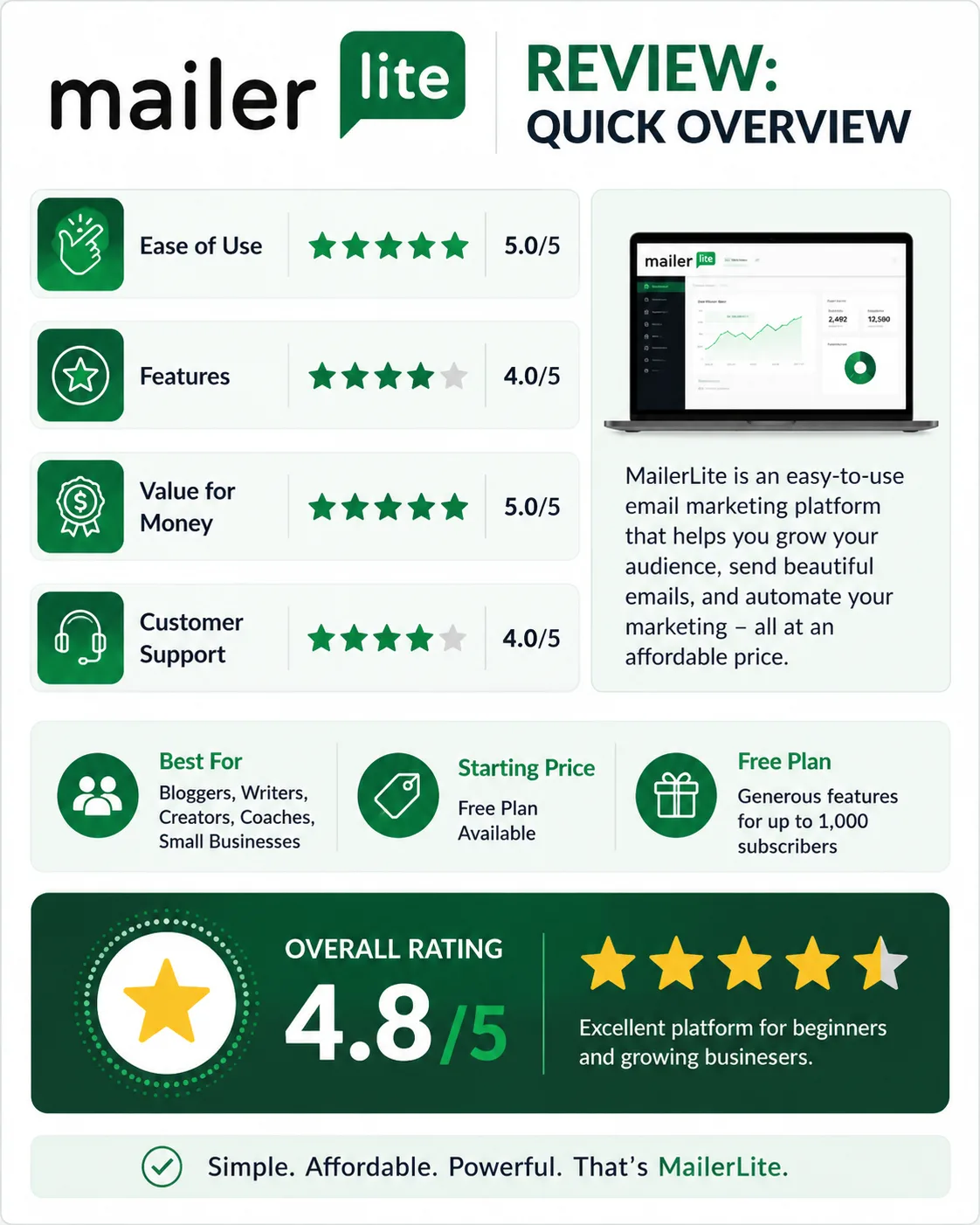
MailerLite is an easy-to-use email marketing platform that offers useful features for bloggers, writers, creators, and small businesses without the complexity of many advanced platforms.
Quick Summary
- Easy-to-use email marketing platform
- Designed for beginners and growing businesses
- Includes email campaigns, automation, landing pages, and forms
- Affordable pricing compared to many competitors
- Free plan available to get started
- Good balance between simplicity and features
Bottom Line: MailerLite is a strong option for bloggers, writers, creators, and small business owners who want useful email marketing features without starting with a complicated platform.
If you're still deciding whether you even need another marketing tool, you don't have to commit to a paid plan first. You can start with the free option, explore the platform, and see whether it fits the way you work.
Try MailerLite Free →Table of Content
- Quick Summary
- What Is MailerLite?
- MailerLite Features
- How Easy Is MailerLite to Use?
- MailerLite Pricing
- MailerLite Pros
- MailerLite Cons
- MailerLite vs Other Email Marketing Platforms
- My Experience Using MailerLite
- Is MailerLite Good for Beginners?
- Is MailerLite Right for You?
- Key Takeaways
- Final Verdict: Is MailerLite Worth It?
- Related Guides
- Frequently Asked Questions About MailerLite
What Is MailerLite?
MailerLite is an email marketing platform that helps businesses create email campaigns, build subscriber lists, automate emails, and grow their audience.
Instead of using separate tools for email marketing, landing pages, signup forms, and automation, you can manage these activities from one dashboard.
The company was founded in 2010 and has grown into a popular email marketing platform for small businesses and content creators. While there are many alternatives on the market, MailerLite has built its positioning around keeping email marketing relatively simple while still providing the features most users need.
The main purpose of MailerLite is straightforward: collect email subscribers and communicate with them through newsletters and automated email sequences.
For example, you can send a welcome email when someone joins your list, deliver a lead magnet automatically, or create a series of educational emails that nurture subscribers over time.
That matters because email marketing becomes much more useful once you stop thinking about it as simply sending newsletters. A good email platform should also help you turn a website visitor into a subscriber and then guide that subscriber through a useful sequence.
MailerLite brings those pieces together, which is one reason it can make sense for someone who doesn't want to manage several different marketing tools.
MailerLite Features
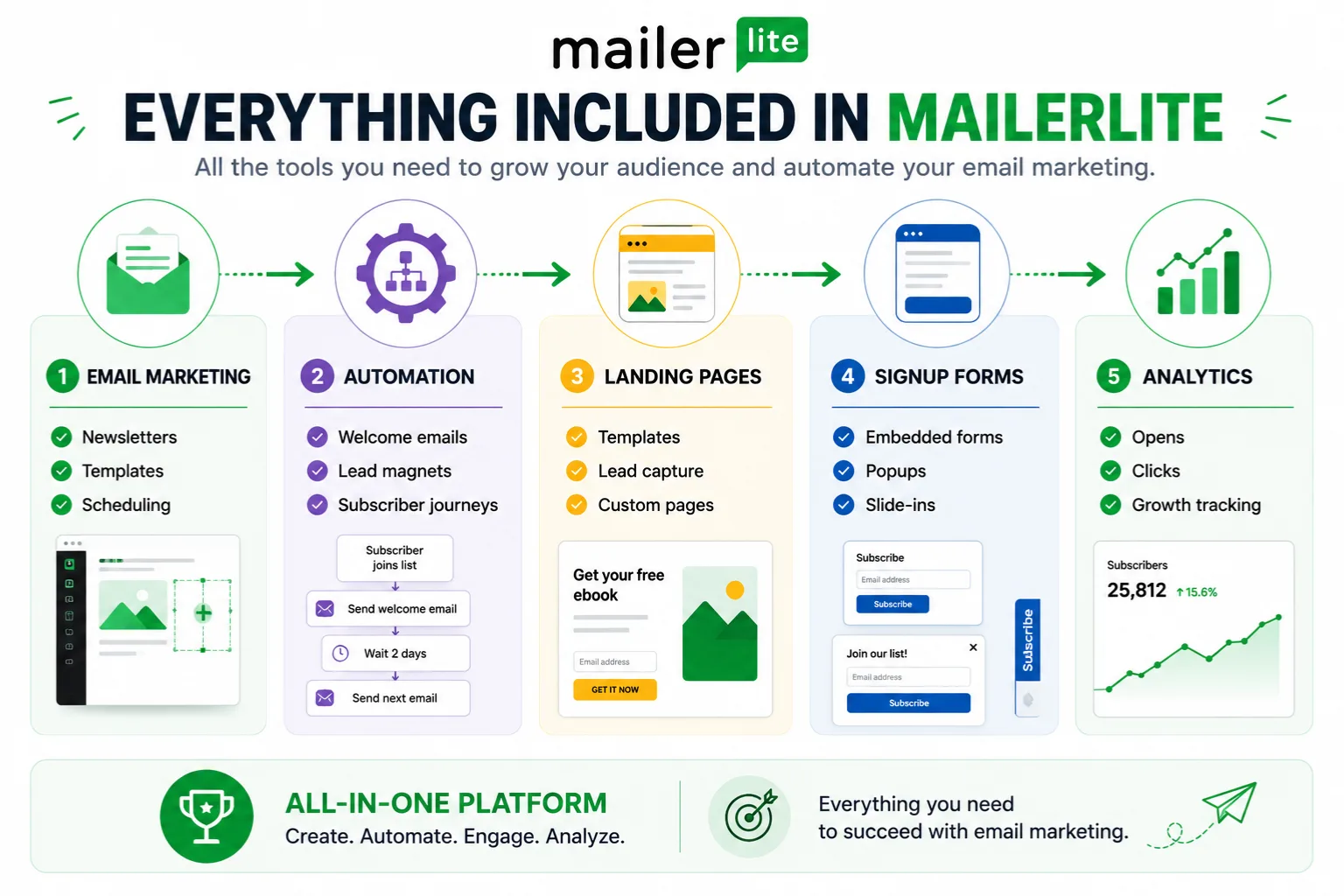
One reason MailerLite appeals to bloggers, writers, creators, and small business owners is that it includes many of the basic tools needed to grow an email list in one platform.
That doesn't mean every user will need every feature. The useful question is what each tool allows you to do with your audience.
Email Campaign Builder
Creating emails is straightforward with MailerLite's drag-and-drop editor. You can start from scratch or choose from pre-designed templates to speed up the process.
The editor lets you add text, images, buttons, videos, product sections, and other content blocks without touching code.
You can create one-time newsletters, promotional emails, product announcements, or regular updates for subscribers. Once your email is ready, MailerLite allows you to send it immediately or schedule it for a future date and time.
For a beginner, the benefit is simple: you can spend your time working on the message rather than figuring out how to build the email itself.
Email Automation
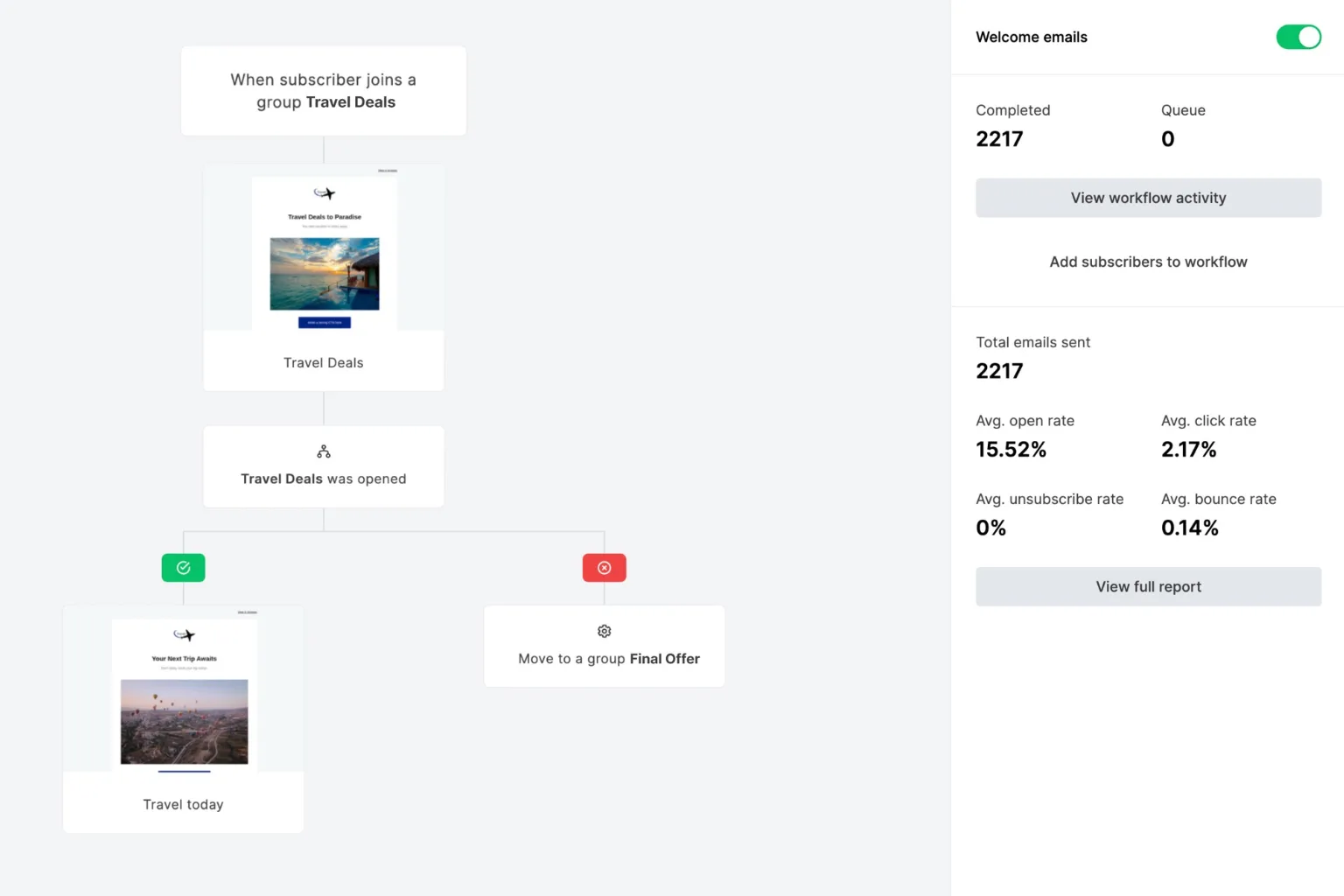
Sending a newsletter once a week is useful. The more interesting question is what happens after someone joins your list.
Automation is one of MailerLite's strongest features because it lets you create workflows that continue after the initial signup.
You can create welcome sequences that automatically send emails when someone joins your list. For example, a new subscriber might receive a welcome email immediately, a lead magnet the next day, and additional educational emails over the following week.
MailerLite also supports trigger-based automations. These workflows can start when someone subscribes, clicks a link, completes a form, or performs another supported action.
This means you don't have to remember to manually send every message in a subscriber journey. You build the workflow once, then let the automation handle the sequence according to the conditions you set.
For example, imagine someone downloads a free writing checklist from your website. Instead of manually sending the checklist and remembering to follow up later, you can create a workflow that delivers the resource and continues with the next messages automatically.
If you're building your first welcome sequence, lead magnet funnel, or subscriber journey, this is one of the areas worth exploring before you choose an email platform.
Explore MailerLite's automation tools
Landing Pages
Getting someone to visit your website is one thing. Getting that visitor to become an email subscriber is another.
MailerLite includes a built-in landing page builder for collecting leads and promoting offers.
The platform provides customizable templates that can be edited using a drag-and-drop system similar to the email builder. This makes it possible to create lead generation pages for ebooks, newsletters, webinars, free courses, and other offers.
For creators who don't want to purchase separate landing page software, this can simplify the setup and reduce the number of tools they need to manage.
That becomes especially useful when you're starting with a simple funnel: someone visits a page, enters their email address, receives a resource, and enters your email sequence.
See how MailerLite handles landing pages and lead capture
Signup Forms

Growing an email list starts with collecting subscribers, and MailerLite offers several ways to do that.
You can create embedded forms that appear inside blog posts and pages, popup forms that capture visitor attention, and slide-in forms that appear while users browse your site.
Each form can be customized to match your branding and connected to specific subscriber groups or automation workflows.
The important point is that your signup form is not just a design element. It is the bridge between your website traffic and your email list.
Once you understand that connection, the value of having forms and email automation in the same platform becomes easier to see.
Subscriber Management
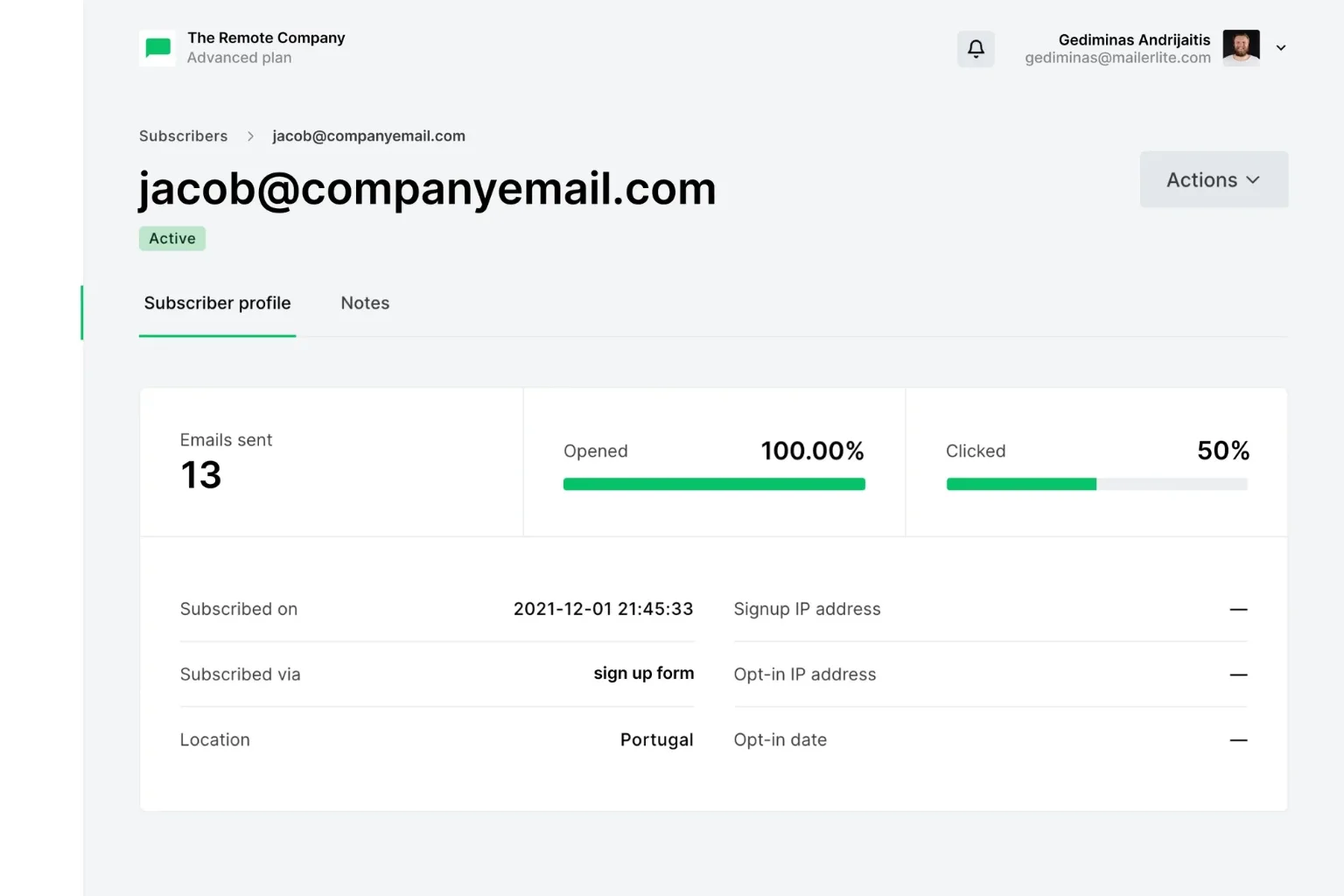
As your list grows, organization becomes important.
MailerLite allows you to manage subscribers using groups, segments, and tags. This makes it easier to send targeted emails instead of broadcasting the same message to everyone.
For example, you can separate newsletter subscribers, customers, and lead magnet downloads into different groups and send content relevant to each audience.
This becomes more important as your audience grows. A small list may be easy to manage manually, but segmentation gives you a way to keep your communication more relevant as you add different types of subscribers.
Analytics and Reporting
MailerLite provides reporting tools that help you understand how your campaigns perform.
You can track email open rates, click rates, subscriber growth, unsubscribe rates, and overall campaign performance.
These metrics give you feedback on which emails generate engagement and which ones need improvement.
While the reporting isn't as advanced as some enterprise platforms, it includes the core information most bloggers, creators, and small businesses need to measure email performance.
How Easy Is MailerLite to Use?
One of MailerLite's biggest strengths is its ease of use.
Many email marketing platforms try to offer every feature imaginable. That can create a dashboard that feels overwhelming, especially when you're launching your first email list.
MailerLite takes a simpler approach. When you first log in, the dashboard is easy to navigate. The main menu gives you access to campaigns, subscribers, forms, sites, automations, and reporting.
Most features are where you would expect them to be, which reduces the time needed to learn the platform.
The learning curve is relatively short compared with many competitors. I found that most beginners can create their first email campaign, signup form, or landing page within a few hours.
Even automation workflows use a visual builder that makes it easier to see how subscribers move through a sequence.
The overall user experience is clean and modern. Pages load quickly, menus are organized logically, and the drag-and-drop builders work without requiring coding skills.
Several beginner-friendly features make the platform easier to approach. Templates help you create emails faster, guided setup steps simplify account configuration, and visual editors remove the need for coding skills.
If you're launching your first email list, those details matter because the biggest obstacle is often not the email itself. It's getting comfortable enough with the software to actually use it consistently.
Overall, MailerLite is relatively easy for beginners to learn while still leaving room to add more sophisticated workflows as your email marketing becomes more developed.
MailerLite Pricing
Pricing is often one of the main reasons people compare MailerLite with competing email marketing platforms.
But price isn't only about the monthly subscription. For a beginner, the cost of learning and managing a complicated platform matters too.
Free Plan
MailerLite offers a free plan that gives new users a way to build an email list and start using the platform without paying upfront.
The free plan includes email campaigns, automation, landing pages, signup forms, websites, and basic reporting tools. Subscriber limits and monthly email sending limits apply, so you'll eventually need to upgrade as your audience grows.
For beginners launching their first blog, newsletter, affiliate site, or online business, the free plan provides a practical starting point.
More importantly, you don't have to decide immediately whether MailerLite will become your long-term email platform. You can use the free option to understand the interface and test whether it fits your workflow first.
Start with MailerLite's free plan
Paid Plans
Paid plans are based primarily on the number of subscribers in your account. As your list grows, your monthly cost increases.
Upgrading unlocks additional features and higher usage limits, including increased email sending capacity, advanced automation options, enhanced reporting, AI-powered tools, and access to more premium features.
What I like about MailerLite's pricing structure is its general simplicity. You can estimate future costs based on the size of your list instead of navigating a large collection of separate product tiers.
Value for Money
MailerLite delivers strong value for many small businesses and individual creators because several core marketing tools are available within the same platform.
You get email marketing, automation, landing pages, signup forms, subscriber management, and reporting without necessarily needing a separate tool for each function.
If you're looking for the cheapest option, other tools may exist. If you're looking for the most advanced enterprise platform, there are stronger alternatives.
The question is whether you need that additional complexity. If your main goal is to build an email list, send newsletters, deliver lead magnets, and create basic automated sequences, MailerLite's combination of features and simplicity can make sense.
If you're still unsure about paying for an email platform, there's no need to make that decision before you've tested the basic workflow.
Explore MailerLite without committing to a paid plan
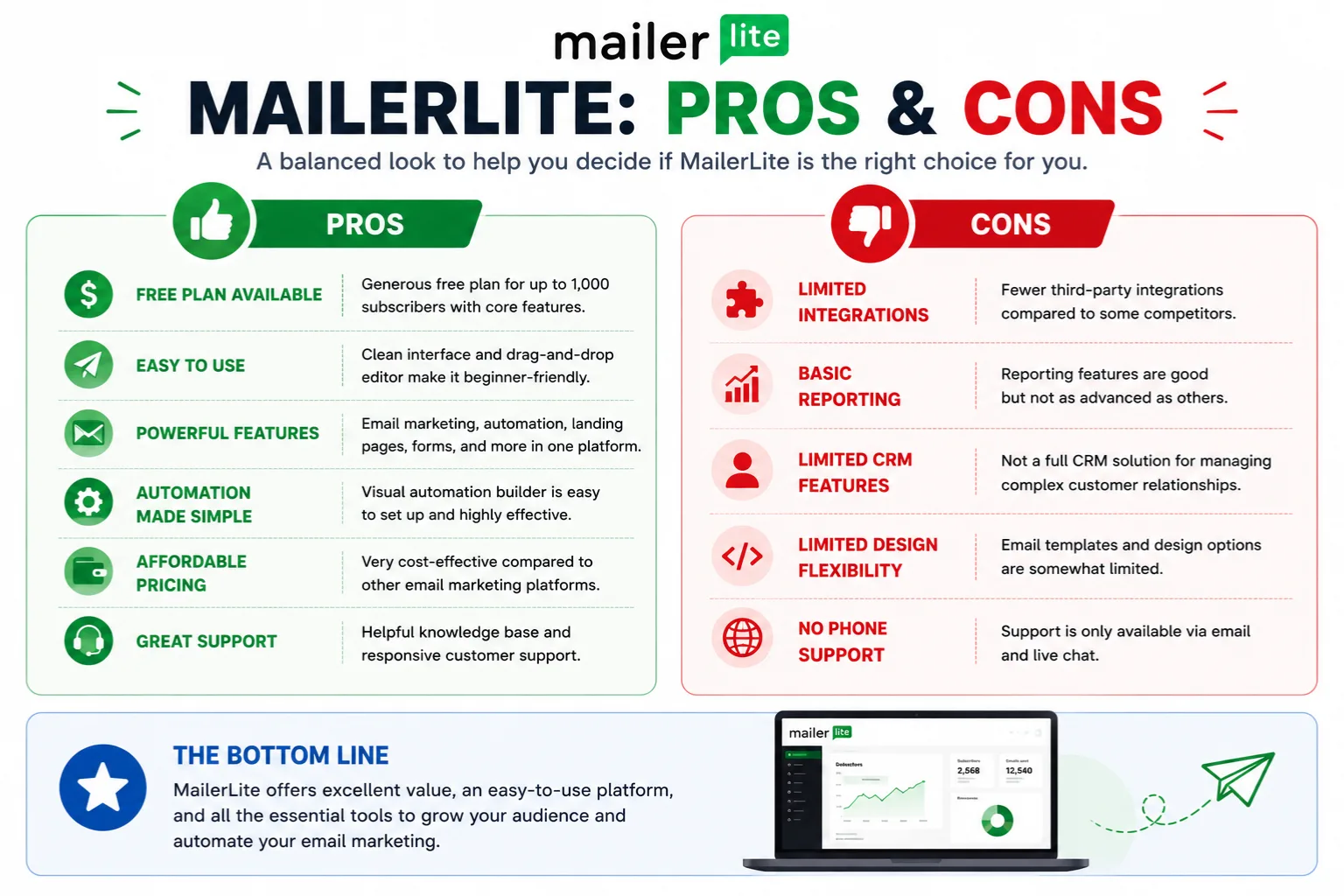
MailerLite Pros
After using MailerLite, several strengths stand out.
- Easy setup process
- Clean and beginner-friendly interface
- Useful email automation features
- Affordable pricing
- Built-in landing page builder
- Good email deliverability
- Generous free plan
The setup process is straightforward. Creating an account, building your first email list, and launching a campaign doesn't require extensive technical experience.
The interface is another advantage. Everything is organized logically, making it easier to find campaigns, automations, forms, landing pages, and subscriber data.
MailerLite also offers useful automation tools. You can create welcome sequences, lead magnet delivery workflows, and subscriber journeys using a visual automation builder.
Pricing is another advantage for users who want to start small. The free plan gives beginners a low-risk way to begin, while paid plans provide additional capacity and features as the list grows.
The built-in landing page builder adds extra value because you can create lead capture pages without automatically adding another software subscription to your marketing stack.
Finally, MailerLite has a strong reputation for email deliverability. After all, even the best email is useless if it never reaches the inbox.
Pros at a Glance
- Easy setup process
- Clean and beginner-friendly interface
- Useful email automation features
- Affordable pricing
- Built-in landing page builder
- Good email deliverability
- Generous free plan
MailerLite Cons
No email marketing platform is perfect, and MailerLite does have a few limitations.
One limitation is the number of email templates available. While the platform includes professionally designed templates, the selection is smaller than what you'll find with some larger competitors.
New users may also encounter an account approval process. MailerLite reviews accounts before granting full access to protect deliverability across the platform. While this serves a purpose, it can be frustrating if you want immediate access.
Automation features are strong for many users, but advanced marketers may eventually hit limitations. Businesses that need highly complex customer journeys or deep behavioral automation may prefer a platform such as ActiveCampaign.
The integration library is also smaller than some larger email marketing providers. Most popular tools are supported, but users with highly specific software requirements should verify compatibility before signing up.
Cons at a Glance
- Fewer email templates than some competitors
- Account approval process for new users
- Limited advanced automation features
- Smaller integration ecosystem
- Not ideal for large enterprise marketing teams
These limitations are important because the right email platform depends on what you're trying to build. A beginner who needs newsletters, forms, landing pages, and a simple welcome sequence has different requirements from a company running complex customer journeys.
MailerLite vs Other Email Marketing Platforms
Choosing an email marketing platform often comes down to your budget, experience level, and feature requirements.
This is also the point where many readers move from research into decision-making. Instead of asking, “What does MailerLite do?” you're asking, “Does it fit what I need better than the alternatives?”
MailerLite vs Kit
MailerLite and Kit are both popular among bloggers, writers, and creators, but they take slightly different approaches.
MailerLite is generally easier for beginners. The dashboard feels simpler, and features such as landing pages, forms, and email campaigns are easy to find and use.
Kit focuses heavily on creators and offers more advanced subscriber management and automation options. If you're building complex funnels, Kit may provide capabilities that MailerLite doesn't.
Pricing is another consideration. Similar subscriber counts can have different costs depending on the features and plan you choose, so it's worth comparing your actual requirements rather than choosing based only on the headline price.
Choose MailerLite if: You want a simpler platform with strong core email marketing features.
Choose Kit if: Advanced creator-focused automation is your priority.
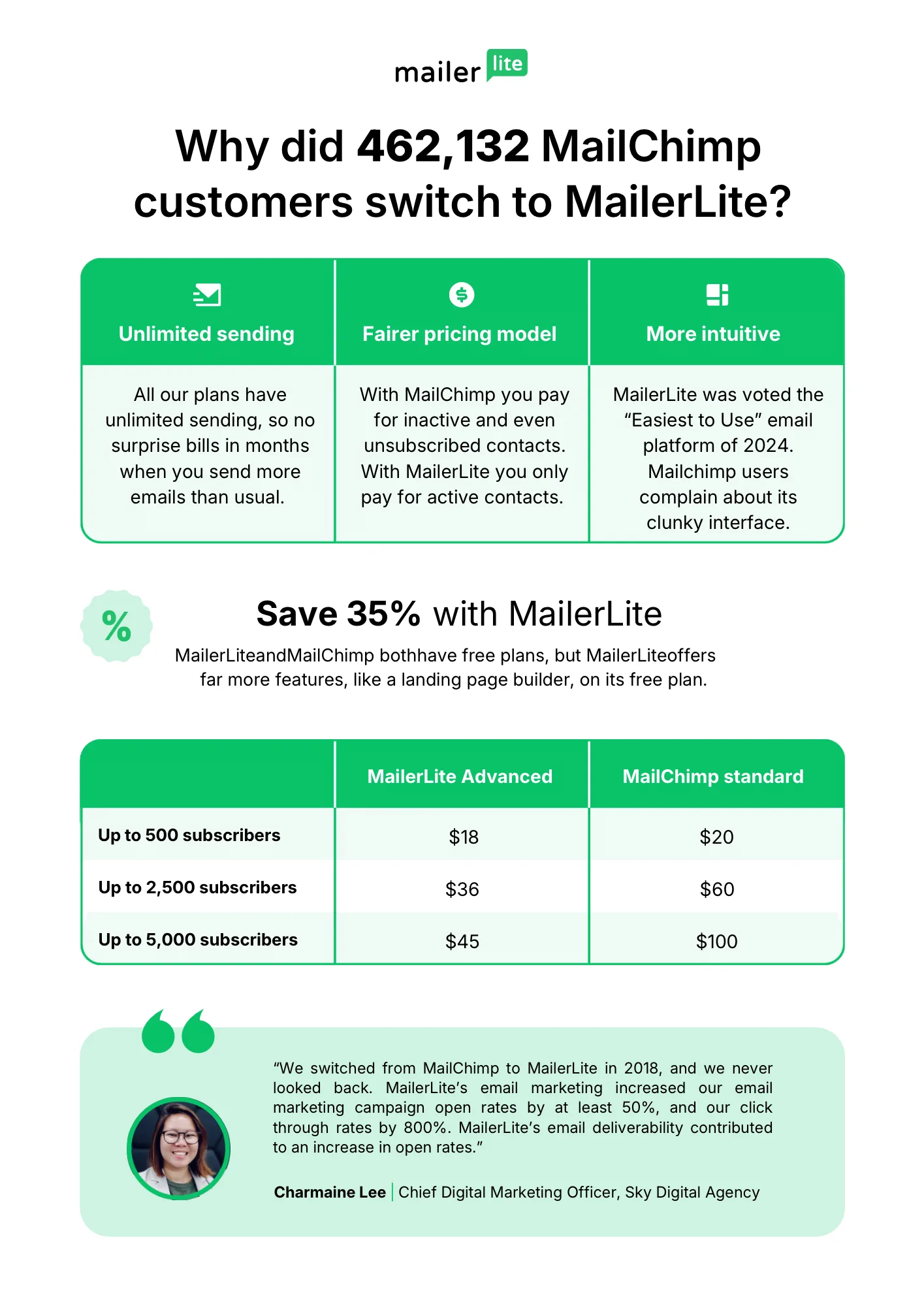
MailerLite vs Mailchimp
Mailchimp is one of the oldest and most recognizable email marketing platforms, but many users compare it directly with MailerLite.
Both platforms offer email campaigns, automations, forms, landing pages, and reporting tools. For many small businesses, both can handle the core email marketing workflow.
The bigger differences are cost, interface, ecosystem, and the features you actually need.
MailerLite's simpler approach can be attractive to beginners who want to get an email campaign running without spending a lot of time learning the platform.
Choose MailerLite if: You want a simpler email marketing workflow and a beginner-friendly starting point.
Choose Mailchimp if: You already use its ecosystem or require a specific Mailchimp integration.
MailerLite vs ActiveCampaign
ActiveCampaign is designed for businesses that need advanced marketing automation and customer journey management.
Its automation capabilities are more sophisticated than MailerLite's. You can build detailed workflows based on subscriber behavior, website activity, purchases, and other data points.
The tradeoff is complexity. ActiveCampaign has a steeper learning curve, more settings, and requires more time to master.
For many bloggers, writers, creators, and small businesses, MailerLite provides enough automation without the additional complexity.
Choose MailerLite if: You want an affordable platform that is relatively easy to learn.
Choose ActiveCampaign if: Advanced automation and customer journeys are essential to your marketing strategy.
Comparison Summary
The comparison becomes simpler when you focus on your actual requirements.
- MailerLite: Simple email marketing, forms, landing pages, and automation.
- Kit: Creator-focused email marketing and more advanced creator workflows.
- Mailchimp: Broad ecosystem and established email marketing tools.
- ActiveCampaign: More advanced automation and customer journey capabilities.
If your requirements are relatively straightforward, there may be little reason to start with the most complicated platform available.
If MailerLite's combination of email marketing, forms, landing pages, and automation matches what you're looking for, the simplest next step is to test the platform yourself.
See if MailerLite fits your workflow
My Experience Using MailerLite
I originally chose MailerLite because I wanted an email marketing platform that was easy to use without becoming expensive as my subscriber list grew.
Many alternatives offered similar features, but MailerLite stood out because it combined email marketing, automation, landing pages, and signup forms in a single platform at a reasonable price.
The first thing I noticed was how quickly I could get started. Creating email campaigns, building forms, and setting up automations felt straightforward.
I didn't have to spend hours watching tutorials or searching through complicated settings just to send my first newsletter.
What worked especially well was the automation builder. Setting up welcome sequences and lead magnet delivery took very little time.
Instead of manually sending resources to new subscribers, everything happened automatically once the workflow was active.
The landing page builder was another feature I found useful. Being able to create opt-in pages without purchasing separate software simplified the entire process.
For bloggers, writers, and creators trying to keep costs low, having these tools built into one platform is a real advantage.
That doesn't mean the experience was perfect. The account approval process can slow things down for new users who want immediate access.
I also noticed that some advanced automation options available in higher-end platforms aren't available in MailerLite. For most users this won't be a problem, but businesses with complex marketing funnels may eventually outgrow the platform.
Overall, the results were positive. I was able to build email lists, automate subscriber onboarding, deliver lead magnets, and send regular newsletters without dealing with unnecessary complexity.
More importantly, I spent less time managing software and more time creating content.
If your goal is to build a newsletter, deliver a lead magnet, and automate your welcome sequence without managing several different tools, this is where MailerLite becomes particularly useful.
Explore MailerLite for yourself
Based on my experience, I would recommend MailerLite to bloggers, digital writers, affiliate marketers, creators, freelancers, coaches, and small business owners.
If your goal is to build and grow an email list using a platform that is affordable and relatively easy to manage, MailerLite is worth considering.
If you need enterprise-level automation, advanced CRM features, or highly customized customer journeys, a platform like ActiveCampaign may be a better fit.
Is MailerLite Good for Beginners?
Yes. MailerLite is designed to be approachable for beginners who want to start building an email list without learning an overly complicated platform first.
Many email marketing tools are packed with advanced features that can make the dashboard feel overwhelming. MailerLite focuses on the core activities most new users need.
The setup process is straightforward. After creating an account and completing the approval process, you can create your first subscriber group, build a signup form, and connect MailerLite to your website.
Creating your first email campaign is also simple. The drag-and-drop editor allows you to build professional-looking emails without coding or design experience.
Building an email list is another area where MailerLite can help beginners. The platform includes embedded forms, popups, slide-ins, and landing pages that help turn website visitors into subscribers.
Managing subscribers is equally straightforward. MailerLite allows you to organize contacts using groups, segments, and tags, making it easier to send relevant emails to different audiences.
What makes the platform useful for beginners is that you don't need to use every feature immediately.
You can start with a basic newsletter and signup form. Once you're comfortable, you can add a lead magnet, build an automated welcome sequence, and introduce segmentation.
That gradual learning path matters. You can begin with the simplest version of your email system and add complexity only when your audience and needs justify it.
If you're launching your first email list and want to see whether MailerLite feels comfortable before paying for a plan, you can start by exploring the free option.
Start building your email list with MailerLite
Is MailerLite Right for You?
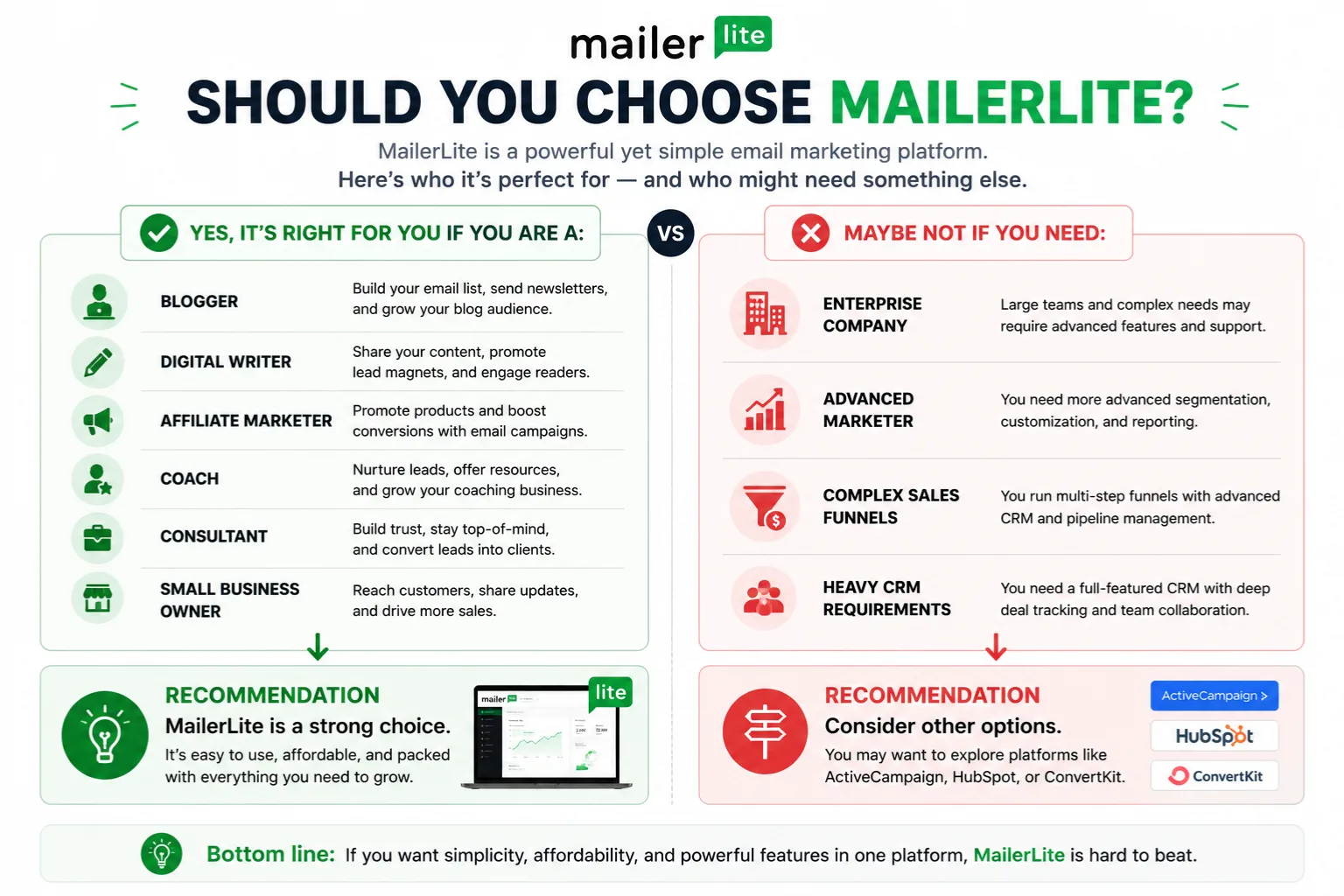
By this point, the decision is less about whether MailerLite has enough features. It is about whether those features match the way you plan to use email marketing.
MailerLite may fit you if:
- You are starting your first email list.
- You want to send newsletters regularly.
- You need signup forms and landing pages.
- You want basic email automation.
- You plan to deliver lead magnets automatically.
- You prefer a simpler interface.
- You want to start without paying for a premium plan immediately.
- You are a blogger, writer, creator, freelancer, coach, consultant, affiliate marketer, or small business owner.
You may need another platform if:
- You need highly complex customer journeys.
- You require advanced behavioral automation.
- You need extensive enterprise-level integrations.
- You operate a large marketing team with sophisticated automation requirements.
- You need advanced CRM functionality built deeply into your marketing platform.
The important distinction is that neither situation is automatically better. A platform should match the complexity of the marketing system you're actually trying to build.
If your requirements are simple today, starting with a simpler platform can make the learning process easier. If your business already depends on complex customer journeys, advanced automation may matter more than simplicity.
If the first list sounds more like your situation, you can test MailerLite before making a longer-term decision.
Key Takeaways
- MailerLite is an email marketing platform designed for bloggers, creators, writers, and small businesses.
- The platform includes email campaigns, automation, landing pages, signup forms, and subscriber management tools.
- Its clean interface and simple setup make it approachable for beginners.
- The free plan provides a way to start building an email list without paying upfront.
- MailerLite offers useful value for users who want several core email marketing tools in one platform.
- Automation features are powerful enough for many users, though advanced marketers may need more specialized tools.
- Built-in landing pages and forms can reduce the need for additional software.
- MailerLite is suitable for newsletters, lead magnets, content promotion, and basic email automation.
- Businesses that require complex automation and enterprise-level features may need a more advanced platform.
- The best choice depends on the complexity of your email marketing requirements.
Final Verdict: Is MailerLite Worth It?
After reviewing its features, pricing, ease of use, and overall value, MailerLite remains a strong option for beginners, creators, bloggers, writers, and small businesses.
Its biggest strengths are its simple interface, accessible starting point, built-in landing pages, useful automation tools, and combination of core email marketing features.
Instead of managing separate tools for every part of your basic email funnel, you can handle email campaigns, lead capture, subscriber management, and automation from one platform.
The platform isn't perfect. The account approval process can be frustrating for new users, the template library is smaller than some competitors, and advanced marketers may eventually outgrow its automation capabilities.
For many bloggers, digital writers, affiliate marketers, creators, coaches, consultants, and small business owners, those limitations may not matter much.
If your goal is to start an email newsletter, grow an email list, deliver lead magnets, or automate basic marketing campaigns, MailerLite gives you a practical place to start.
MailerLite is worth considering if you want:
- An easy-to-use email marketing platform
- Accessible pricing as your list grows
- Built-in landing pages and forms
- Reliable email delivery
- Simple automation workflows
- A beginner-friendly experience
You may want another platform if you need:
- Enterprise-level features
- Advanced automation and customer journeys
- Extensive third-party integrations
For the reader who wants to start a list, send useful emails, collect subscribers, and automate the basic follow-up without learning a complex marketing system first, MailerLite is a logical platform to test.
You don't need to decide today whether it will be your platform for the next five years. The more useful question is whether it can handle the email workflow you need right now.
Start with the free plan, explore the features, and see whether MailerLite fits your email marketing workflow before deciding whether you need a paid account.
Frequently Asked Questions About MailerLite
Is MailerLite free?
Yes. MailerLite offers a free plan that allows users to build an email list, create email campaigns, use basic automation, build landing pages, and create signup forms. Limits apply, so larger lists and users who need additional features may eventually need a paid plan.
How many subscribers can MailerLite handle?
MailerLite supports both small and larger email lists, with pricing and available features changing as your subscriber count grows. This makes it suitable for new bloggers as well as established businesses, although your requirements may change as your list becomes larger.
Is MailerLite better than Mailchimp?
For many beginners and small businesses, MailerLite can be easier to use and may provide a simpler starting point than Mailchimp. However, Mailchimp has its own ecosystem, integrations, and features, so the better fit depends on what you need.
Does MailerLite have automation?
Yes. MailerLite includes automation tools that allow you to create welcome sequences, lead magnet delivery workflows, and trigger-based email campaigns.
Can beginners use MailerLite?
Yes. MailerLite is designed to be approachable for beginners, with a relatively clean dashboard and drag-and-drop editors. New users can start with basic campaigns and forms before adding automation and segmentation.
Is MailerLite good for bloggers?
Yes. MailerLite can be useful for bloggers because it combines email marketing, forms, landing pages, automation, and subscriber management in one platform. This makes it possible to build a basic email funnel without immediately adding several separate tools.
Should I start with MailerLite's free plan?
If you're new to email marketing and aren't sure which platform fits your workflow, starting with the free option gives you a way to explore the platform before committing to a paid plan.