
Most websites fail for one simple reason. The message doesn’t connect.
You can have a clean design, fast loading speed, and solid SEO. But if your words don’t speak to the reader, nothing happens. No clicks. No trust. No sales.
I’ve seen this again and again. Pages filled with vague phrases like “we provide quality solutions.” That means nothing to a real person trying to solve a real problem.
In this website copywriting guide, you’ll learn how to write copy that actually works. Clear, simple, and focused on what your reader cares about. Not what sounds good to you.
If you are new to persuasive writing, start with copywriting basics for beginners to build a strong foundation before improving your website pages.
Website Copywriting Guide (Quick Summary)
Website copywriting is the process of writing clear, persuasive words for your website that help visitors take action. Good website copy improves trust, explains your offer fast, and increases leads or sales.
- Use clear headlines that explain what you do right away.
- Focus on benefits instead of only listing features.
- Write for the reader by addressing their problems and goals.
- Add proof like testimonials, examples, or results.
- Use one clear CTA such as book a call or get a quote.
- Keep pages simple and avoid vague or overloaded copy.
- Optimize for SEO by using keywords naturally in titles and headings.
Table of Content
- Website Copywriting Guide (Quick Summary)
- What Is Website Copywriting? (And Why It Matters)
- The Goal of Website Copy (What You’re Really Trying to Do)
- Know Your Audience Before You Write
- Core Website Copywriting Principles That Always Work
- Essential Website Pages and What to Write on Each
- Proven Website Copywriting Frameworks You Can Use
- How to Write Headlines That Grab Attention?
- Writing Persuasive Website Copy Step by Step
- SEO for Website Copywriting (Without Killing Readability)
- Common Website Copywriting Mistakes to Avoid
- Website Copywriting Checklist (Before You Publish)
- Key Takeaways
- Conclusion
- Frequently Asked Questions
What Is Website Copywriting? (And Why It Matters)
I used to think website copy was just “text on a page.” Fill the homepage, explain the service, done. That mindset cost me time and results.
The truth hit when I changed just one headline on a service page. Same design. Same offer. More inquiries came in within days. Nothing else changed. That’s when I realized what website copywriting actually does.
Definition of website copywriting in simple terms
Website copywriting is the process of writing words on your website that guide a visitor toward a specific action.
That action could be:
- Clicking a button
- Signing up for a list
- Booking a call
- Buying a product
It’s not just writing. It’s intentional writing with a goal.
Every sentence should help the reader move one step closer to that action.
If your words don’t guide, they distract.
Difference between copywriting and content writing
This confused me early on, and I see beginners mix it up all the time.
Here’s the simple way to look at it:
- Copywriting = written to persuade and drive action
- Content writing = written to inform, educate, or entertain
For example:
- A blog post explains a topic → content writing
- A landing page sells a service → copywriting
Both matter. But they serve different roles.
Content brings people in. Copy converts them once they arrive.
If your website has traffic but no results, weak copy is often the reason.
Why copywriting directly impacts conversions and sales?
People don’t buy because your website exists. They buy because your message makes sense to them.
When your copy is clear and focused:
- Visitors understand what you offer fast
- They see how it helps them
- They trust you enough to take the next step
When it’s vague or confusing:
- They hesitate
- They leave
- They forget you
I’ve seen pages with average design outperform “perfect” websites just because the message was simple and direct.
Words do the heavy lifting.
The role of clarity, trust, and persuasion
Good website copy rests on three things.
- Clarity: If people don’t understand your message in seconds, they won’t stay. Simple beats clever every time.
- Trust: Readers look for signs that you’re credible. Specific details, real examples, and honest language help here.
- Persuasion: This isn’t about tricks. It’s about showing the reader why your offer makes sense for them.
When these three work together, your copy feels natural. Not pushy. Not forced.
Real examples of good vs bad website copy
Here’s where things usually click.
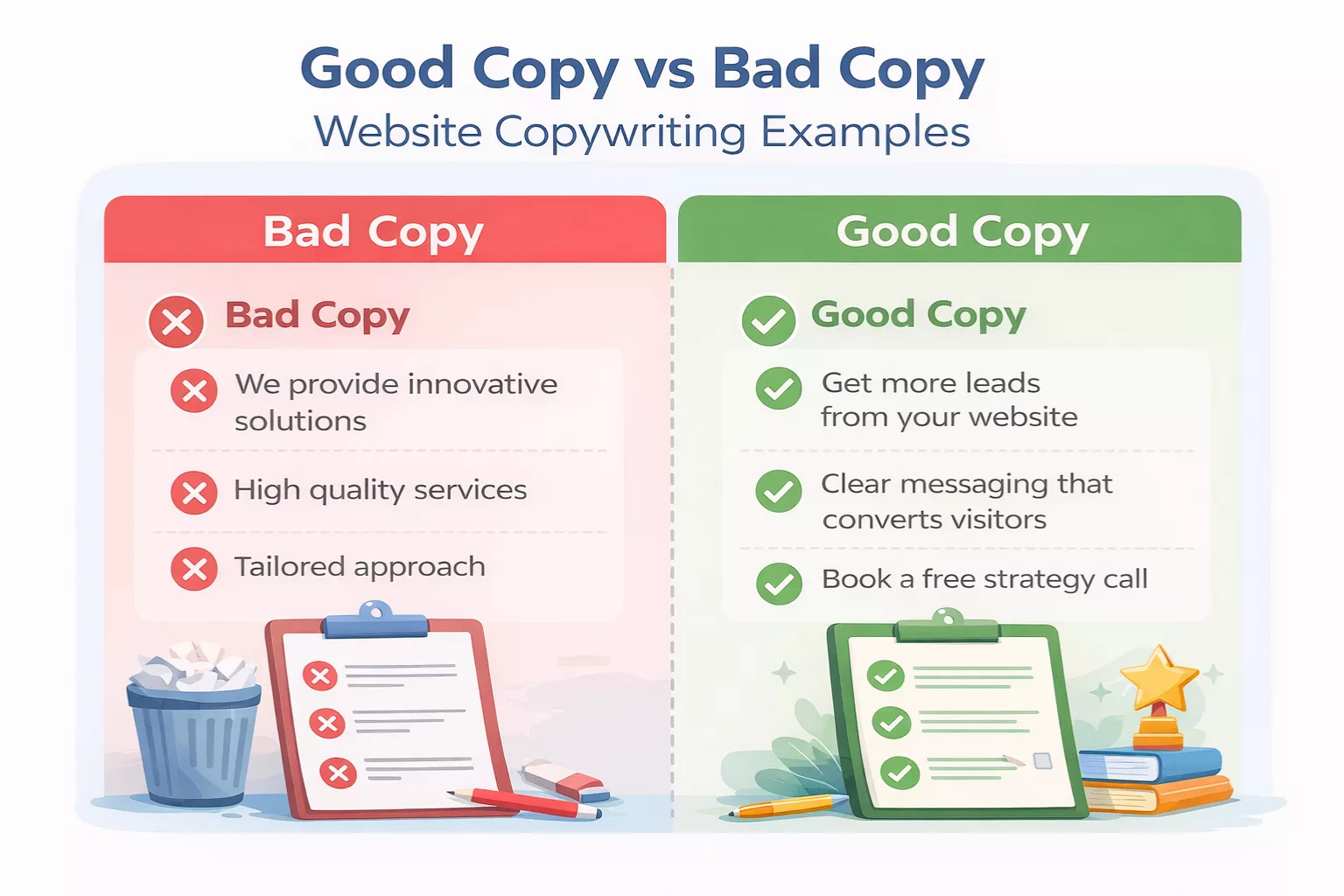
Bad copy:
- “We provide innovative solutions for modern businesses.”
- “High-quality services tailored to your needs.”
These sound nice, but they say nothing.
Good copy:
- “Get more leads from your website without paying for ads.”
- “We rewrite your homepage so visitors understand what you do in 5 seconds.”
See the difference?
Good copy is:
- Specific
- Easy to understand
- Focused on the reader
Bad copy is:
- Vague
- Generic
- Focused on the business
When I started rewriting pages this way, results changed fast. Not overnight, but fast enough to notice.
That’s why website copywriting matters. It turns a website from something people visit into something that actually works.
To understand the psychology behind why words influence action, read how copywriting works.
The Goal of Website Copy (What You’re Really Trying to Do)
I used to treat website pages like storage space. Add more info, explain everything, cover all angles. It felt productive, but it didn’t work.
People landed on the page and did nothing.
No clicks. No messages. Just silence.
The problem wasn’t traffic. It was direction. The page had no clear goal, so the reader had no clear next step.
Once I fixed that, things started moving.
Why every page needs a clear purpose?
Every page on your website should answer one simple question:
“What do I want this person to do next?”
If you don’t decide that, the reader won’t either.
- A homepage might guide someone to learn more.
- A service page might push toward booking a call.
- A landing page might focus on getting an email.
Different pages, different goals.
But each page needs one main purpose. Not five.
When the purpose is clear, writing becomes easier. You stop guessing what to say. You start guiding the reader step by step.
Common goals: lead generation, sales, clicks, sign-ups
Most website pages fall into a few clear categories.
- Lead generation → collect emails or inquiries
- Sales → sell a product or service
- Clicks → move users to another page
- Sign-ups → register for something (course, webinar, tool)
Each goal shapes how you write.
For example, a lead generation page needs:
- Trust
- Low friction
- Clear value
A sales page needs:
- Strong benefits
- Objection handling
- Proof
If you mix these goals on one page, the message gets messy fast.
How to match copy to user intent?
This is where most people lose conversions.
Visitors don’t land on your page randomly. They come with a specific intent.
Some are just exploring.
Some are comparing options.
Some are ready to act.
Your job is to match your message to that mindset.
If someone searches “what is website copywriting,” they want to understand.
If they search “hire website copywriter,” they want results.
If your page doesn’t match that intent, they leave.
I’ve made this mistake before. Wrote a detailed guide for a page where people just wanted a quick answer and a next step. Bounce rate shot up.
Match the intent, and the rest becomes easier.
Strong website copy matches what visitors are looking for. If you want to understand how to write for different reader goals, read Search Intent for Writers.
One page, one goal rule
This rule changed how I write.
One page = one primary goal.
That doesn’t mean you can’t have secondary actions. But one action should stand out clearly.
If your page asks visitors to:
- Read a blog
- Subscribe to a newsletter
- Book a call
- Follow on social media
They’ll likely do none of it.
Too many choices create hesitation.
When there’s one clear path, people follow it.
Why confusion kills conversions?
Confusion is quiet. You don’t always notice it right away.
But it shows up in behavior:
- People skim and leave
- They don’t scroll
- They don’t click
If your message is unclear, people won’t try to figure it out. They move on.
Simple wins here:
- Clear headline
- Straightforward language
- Obvious next step
Whenever I review a page now, I ask one question:
“Can someone understand this in 5 seconds?”
If not, it needs work.
Because in most cases, you don’t lose people because your offer is bad.
You lose them because your message didn’t make sense fast enough.
Know Your Audience Before You Write
I used to skip this step.
I thought I knew my audience. I had a rough idea in my head, so I jumped straight into writing. The result looked fine on the surface, but it didn’t connect. People read it, then left.
That’s when it clicked. If you don’t understand who you’re writing for, your copy turns into guesswork.
And guesswork sounds like… well, generic noise.
Why guessing your audience leads to weak copy?
When you guess your audience, you write vague statements.
Things like:
- “Grow your business online”
- “Improve your results fast”
These lines could apply to anyone. That’s the problem.
When your message tries to speak to everyone, it ends up speaking to no one.
Strong copy feels specific. It makes the reader think, “This is exactly what I’m dealing with.”
That only happens when you stop guessing and start observing.
How to identify pain points and desires?
Good copy starts with two things:
- What your reader is struggling with
- What they want instead
Sounds simple, but most people stay too surface-level.
For example:
- Surface pain: “I need more website traffic”
- Real pain: “I’m putting in effort, but nothing is working and I feel stuck”
That second one is where connection happens.
Same with desires:
- Surface desire: “Make more money”
- Real desire: “Have a steady income so I don’t stress every month”
When you write to the deeper layer, your copy feels human. Not robotic.
Simple research methods (forums, reviews, comments)
You don’t need fancy tools to understand your audience.
Some of the best insights come from places people speak freely.
Here’s what works:
- Forums: Look at questions people repeat
- Product reviews: Pay attention to complaints and praise
- Blog comments: See what confuses people
- YouTube comments: Raw, unfiltered language
I’ve spent hours just reading how people describe their problems. It changes how you write.
You stop inventing phrases. You start using theirs.
Writing in the reader’s language
This part makes a huge difference.
If your audience says:
- “I feel lost with my website”
And you write:
- “Optimize your digital presence for improved performance”
You lose them.
Simple language builds connection. It feels familiar. Easy to follow.
One trick I use is to lift phrases directly from research and shape them into sentences.
Not copy-paste. Just adapt.
When readers recognize their own words, they trust the message faster.
Mistake: writing for yourself instead of the reader
This one still creeps in if I’m not careful.
It shows up when you write:
- What you want to say
- What sounds impressive
- What makes you look smart
Instead of what the reader needs to hear.
The shift is simple, but not always easy:
From:
- “Here’s what I offer”
To:
- “Here’s how this helps you”
Every time I review a page, I check this.
If most sentences are about “we” instead of “you,” I know the focus is off.
Because at the end of the day, people don’t care about your business first.
They care about their problem.
Your job is to meet them there.
One practical way to understand customer language is to study product reviews. Platforms like Amazon often reveal the exact words buyers use when describing problems and goals.
Core Website Copywriting Principles That Always Work
I’ve tried the clever route.
Fancy words. Smart phrases. Lines that sounded impressive in my head.
They didn’t convert.
What actually worked felt almost too simple. Clear sentences. Direct ideas. Words people already use.
These principles look basic, but they carry most of the results. I keep coming back to them every time a page underperforms.
Clarity over cleverness
If someone has to think about what you mean, you’ve already lost them.
I once wrote a headline that sounded sharp. It had rhythm, wordplay, the whole thing. I liked it.
Then I asked someone what it meant.
They paused. Guessed. Got it wrong.
That was enough.
Clear copy doesn’t try to impress. It tries to be understood fast.
Instead of:
- “Elevate your digital presence”
Write:
- “Get more leads from your website”
One is vague. The other is obvious.
Clear wins every time.
Benefits over features
Features describe what something is. Benefits explain why it matters.
Most websites list features and expect the reader to connect the dots.
They won’t.
For example:
- Feature: “Fast-loading website”
- Benefit: “Your visitors stay instead of leaving after 3 seconds”
See the shift?
Benefits answer the question running in the reader’s mind:
“What’s in it for me?”
If your copy doesn’t answer that clearly, people move on.
Specificity builds trust
Vague claims feel empty.
Specific details feel real.
Compare these:
- “We help businesses grow online”
- “We help service businesses get 10–20 qualified leads per month”
The second one feels more believable. Even if the reader doesn’t fully understand how it works.
Specific numbers, outcomes, and examples make your message stronger without adding more words.
Whenever I see weak copy now, it’s almost always too general.
Simple words win
Simple doesn’t mean basic. It means easy to understand.
I used to think longer words made copy sound more professional. In reality, they slow the reader down.
People skim. They don’t study your page.
Short words and short sentences help them move.
Instead of:
- “Utilize strategic methodologies”
Write:
- “Use simple steps”
Same idea. Less friction.
Emotional connection before logic
People don’t act on logic first. They react to how something feels.
If your copy jumps straight into explanations, you miss the moment where the reader decides if this is for them.
Start by showing you understand their situation.
Something like:
- “You’ve tried fixing your website, but nothing seems to change”
That line alone can keep someone reading.
Once they feel understood, then you can explain your solution.
Emotion opens the door. Logic supports the decision.
Writing like you speak
This one changed my writing the most.
When copy sounds like a real person talking, it feels easier to trust.
When it sounds like a brochure, people tune out.
A simple test I use:
Read the sentence out loud.
If it feels awkward to say, it will feel awkward to read.
Natural writing has:
- Short sentences
- Everyday words
- A steady flow
You don’t need to sound perfect. You need to sound real.
These principles don’t depend on trends or tools. They’ve worked for years, and they still work now.
Whenever something feels off in your copy, come back to these.
Most of the time, the fix is simpler than you think.
Essential Website Pages and What to Write on Each
I used to treat every page the same.
Add some text, explain the offer, throw in a button, done.
But each page has a different job. When you write them the same way, they lose focus. And when focus is gone, results drop.
Once I started writing each page based on its role, things became easier. The structure made sense. The message felt tighter. People started taking action.
Here’s how to approach the core pages on your website.
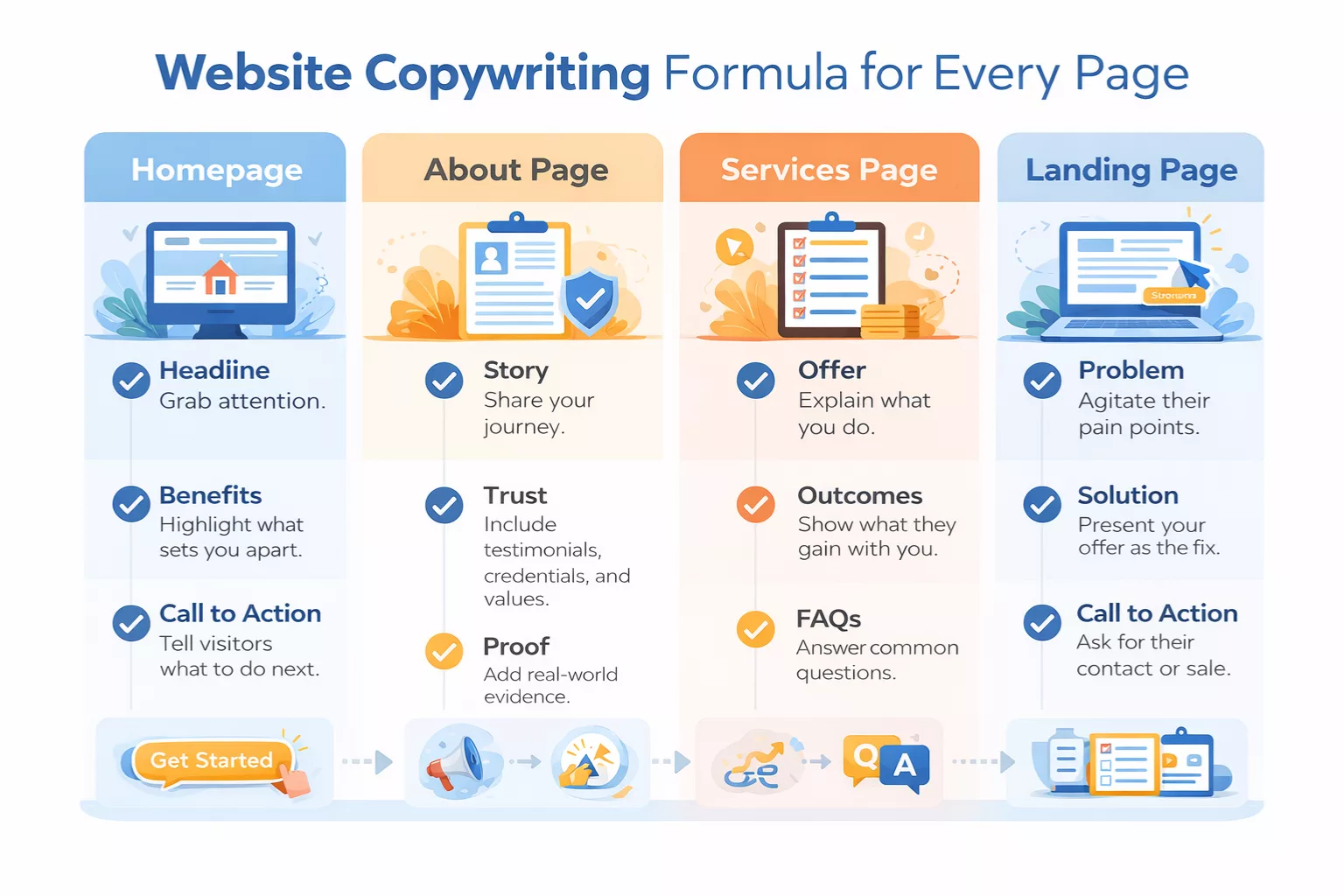
Homepage
Your homepage is not where you say everything. It’s where you make people stay.
Most visitors decide within seconds if they’ll continue. That decision comes down to one thing. Do they understand what you do and if it helps them?
Start with a clear headline.
Not clever. Not abstract. Just direct.
Bad:
- “Transforming digital experiences”
Better:
- “We help small businesses get more leads from their website”
Then add a supporting subheadline that expands the idea.
Explain who it’s for or how it works.
Next, focus on benefits and outcomes.
What changes for the reader if they work with you?
What problem goes away?
After that, include social proof.
- Testimonials
- Results
- Client logos
Even one strong example helps build trust.
Finally, guide them with a clear call to action.
Don’t make them think.
- “Book a call”
- “Get a quote”
- “Start here”
Your homepage should feel like a simple path, not a maze.
About Page
This page is not about you. That took me a while to accept.
Yes, it tells your story. But the goal is to make the reader trust you.
Start with your story with purpose.
Why did you start? What led you here? Keep it relevant to what you offer.
Skip long timelines that don’t connect to the reader.
Then answer this quietly important question:
Why should they care?
Tie your story back to them.
- What do you understand about their situation?
- What have you seen that helps you solve their problem?
This is where trust builds.
Add proof where you can:
- Experience
- Results
- Specific situations you’ve handled
Keep it simple. Honest works better than polished.
Services Page
This is where people decide if your offer fits them.
Clarity matters more here than anywhere else.
Start with a clear breakdown of your offer.
- What you do
- What’s included
- How it works
Avoid vague descriptions.
Then explain who it’s for.
This filters the right people in and the wrong people out.
Something like:
- “This is for service businesses that want more qualified leads without paid ads”
Next, show results they can expect.
Not promises. Just realistic outcomes.
- More inquiries
- Better conversion rates
- Clear messaging
Then handle doubts with FAQs.
Think of the questions people hesitate to ask:
- How long does it take?
- What do you need from me?
- What if it doesn’t work?
Answer them simply.
When this page is done right, it removes friction. The reader feels ready, not unsure.
Landing Page
A landing page has one job.
Get the reader to take one action.
That’s it.
No distractions. No extra links. No mixed messages.
Start with the problem.
Show that you understand what the reader is dealing with.
- What’s not working?
- What’s frustrating?
Then move to the solution.
Explain how your offer fixes that problem. Keep it simple.
Focus on outcomes, not process.
As they scroll, reinforce the message with:
- Benefits
- Proof
- Clear explanations
And then comes the most important part.
Strong CTA placement.
Don’t hide it at the bottom.
Place it:
- After the headline
- After key sections
- At the end
Make it easy to act at any point.
When each page has a clear role, writing becomes easier. You stop trying to say everything everywhere. Instead, you guide the reader step by step.
That’s what turns a website into something that actually works.
Proven Website Copywriting Frameworks You Can Use
I used to write everything from scratch.
Open a blank page, start typing, hope it flows. Sometimes it worked. Most times, it didn’t.
What changed things for me was using simple frameworks. Not rigid templates, but guides that keep your message focused.
They help you avoid rambling. They give your copy a clear direction. And when you’re stuck, they give you a place to start.
Here are the ones I keep coming back to.
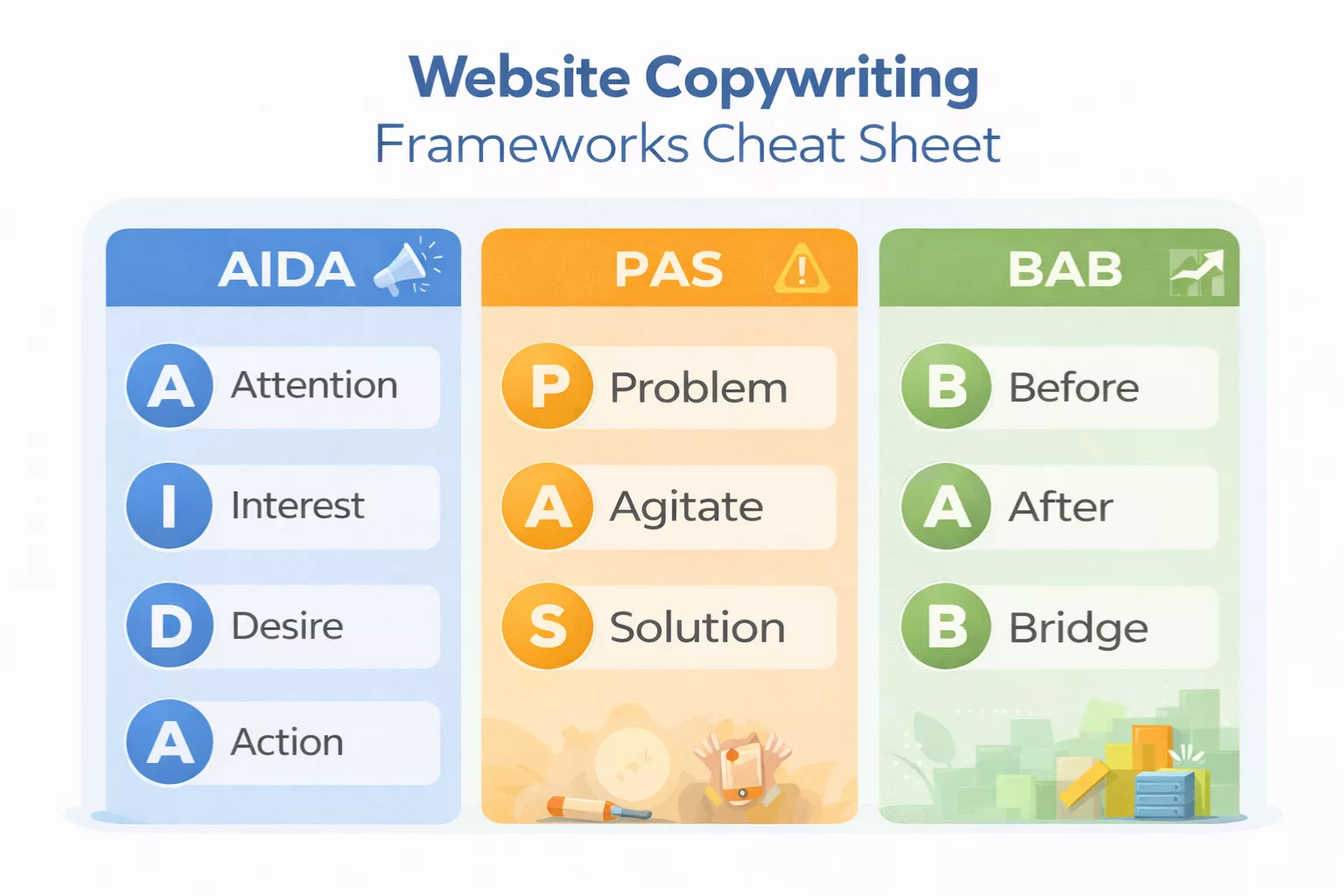
AIDA (Attention, Interest, Desire, Action)
One of the most trusted formulas is the AIDA copywriting formula, which helps guide readers from attention to action.
This is one of the oldest frameworks, and it still works.
It follows a natural flow of how people make decisions.
- Attention → Grab interest with a clear, relevant idea
- Interest → Keep them reading by showing you understand their situation
- Desire → Show how your solution improves their life
- Action → Tell them what to do next
I’ve used this a lot on landing pages and service pages.
Example flow:
- Headline: “Get more leads from your website without ads”
- Opening: Talk about low conversions or wasted traffic
- Middle: Show how your approach fixes that
- End: “Book a call”
It’s simple, but it keeps your message moving forward.
PAS (Problem, Agitate, Solution)
This one hits harder emotionally.
- Problem → Identify what’s not working
- Agitate → Show the cost of leaving it unfixed
- Solution → Present your offer as the answer
I like using PAS when the reader already feels the pain but hasn’t taken action yet.
For example:
- Problem: “Your website gets traffic but no inquiries”
- Agitate: “You keep tweaking things, but nothing changes”
- Solution: “We rewrite your copy so visitors understand and act”
The key here is not to overdo the agitation. Just enough to make the problem feel real.
Before-After-Bridge
This one is clean and easy to follow.
- Before → Describe the current situation
- After → Show the improved outcome
- Bridge → Explain how to get there
It works well when you want to paint a clear transformation.
Example:
- Before: “Your homepage confuses visitors”
- After: “Visitors understand what you do in seconds”
- Bridge: “We simplify your message and structure your copy”
I use this a lot for homepage sections and quick value propositions.
How to choose the right framework?
There’s no perfect framework. It depends on where the reader is.
Here’s how I think about it:
- Use AIDA when you need a full journey from awareness to action
- Use PAS when the problem is already clear and needs urgency
- Use Before-After-Bridge when you want to highlight transformation
If I’m not sure, I start writing and see which structure fits naturally.
You don’t need to force it. The message should lead, not the framework.
When to keep it simple instead?
This took me a while to accept.
You don’t always need a framework.
Sometimes the best copy is just:
- A clear statement
- A short explanation
- A direct call to action
No structure. No formula. Just clarity.
For example:
- “We write website copy that helps visitors understand what you do and take action. Book a call to get started.”
That’s it.
Frameworks are tools. Not rules.
If your message is already clear, don’t complicate it just to fit a model.
Most of the time, these frameworks work quietly in the background.
You don’t need to label them or follow them perfectly.
Just use them to guide your thinking.
Because in the end, good copy isn’t about structure.
It’s about making your message easy to follow and easy to act on.
If you want to go beyond free tips and learn a proven system, Web Copywriting Handbook is worth a look.
How to Write Headlines That Grab Attention?
I used to treat headlines like a quick step.
Write something decent, move on to the “real” content. That approach cost me results.
The headline decides if people read anything else. If it fails, the rest of your copy doesn’t matter.
I’ve seen pages improve just by changing a single line at the top. Same offer. Same layout. Better response.
That’s the weight a headline carries.
Why headlines matter more than anything else?
Most people don’t read. They scan.
Your headline is the first filter. It answers one silent question:
“Is this worth my time?”
If the answer isn’t clear in seconds, they leave.
A strong headline:
- Stops the scroll
- Signals relevance
- Sets expectations
A weak one gets ignored, even if the rest of the page is solid.
That’s why I spend more time on headlines than most sections.
Clear vs clever headline examples
This is where many writers slip.
Clever headlines feel smart. Clear headlines get results.
Examples:
Clever:
- “Where Strategy Meets Innovation”
- “Redefining Your Digital Presence”
They sound polished. But they don’t say anything concrete.
Clear:
- “Get More Leads From Your Website Without Ads”
- “We Rewrite Your Homepage So Visitors Take Action”
You know exactly what to expect.
When in doubt, choose clarity. You can always refine later, but if people don’t understand it, they won’t stay.
Using curiosity and specificity
Curiosity pulls people in. Specificity makes them trust it.
Used together, they make headlines stronger.
For example:
- “Why Your Website Gets Traffic but No Leads”
This works because:
- It calls out a common problem
- It hints at an explanation
- It feels relevant
Specificity adds weight:
- “How to Get 10–20 Qualified Leads a Month From Your Website”
Now it feels real. Not vague.
The balance matters.
Too much curiosity:
- “This One Trick Will Change Everything”
Too vague.
Too much detail without hook:
- “Website Optimization Techniques for Conversion Improvement”
Too dry.
Blend both.
Common headline mistakes
I’ve made all of these at some point.
- Being too vague
“Improve your business today” doesn’t mean anything - Trying to sound impressive
Big words don’t equal strong headlines - Focusing on yourself
“We offer…” instead of “You get…” - Lack of relevance
If it doesn’t match what the reader wants, it fails - Overpromising
Sounds good, but breaks trust
If a headline feels unclear, it probably is.
Simple headline formulas
You don’t need to invent headlines from scratch every time.
These simple formats work well:
- How to [result] without [pain]
“How to Get More Leads Without Running Ads” - Get [result] in [timeframe]
“Get a Clear Website Message in One Week” - [Problem] + [solution]
“Low Website Conversions? Fix Your Copy First” - Why [problem] happens (and how to fix it)
“Why Your Website Isn’t Converting (And What to Change)” - Who it’s for + result
“Website Copywriting for Service Businesses That Want More Clients”
I still use these as starting points. Then I tweak them until they feel natural.
A good headline doesn’t try to impress. It tries to connect fast. If someone reads it and thinks, “This is for me,” you’ve done your job.
Writing Persuasive Website Copy Step by Step
I used to jump straight into explaining the offer.
What it is. How it works. Why it’s great.
It felt logical. But it didn’t convert.
The shift happened when I stopped starting with the product and started with the person reading the page. Everything became easier to follow. The message felt more natural. And people actually responded.
Here’s the simple flow I use now.
Start with the reader’s problem
Every strong piece of copy begins here.
Not with your service. Not with your process. With the problem the reader is dealing with.
You don’t need to be dramatic. Just be accurate.
Something like:
- “Your website gets traffic, but no one reaches out”
That line alone can stop someone from leaving. Because it reflects their situation.
If you miss this step, the rest of your copy feels disconnected.
Show understanding (emotional connection)
Once you name the problem, show that you understand it.
This is where most copy either connects or falls flat.
You’re not just describing a situation. You’re acknowledging how it feels.
- Frustration
- Confusion
- Doubt
For example:
- “You’ve tried changing things, but nothing seems to make a difference”
This builds trust fast.
People don’t want perfect explanations first. They want to feel understood.
Present your solution clearly
Now you introduce your offer.
Keep it simple.
Avoid long explanations about your process. Focus on what it does.
Instead of:
- “We use a structured messaging framework to optimize conversion pathways”
Say:
- “We rewrite your website so visitors understand what you do and take action”
Clear beats detailed here.
If people don’t understand your solution quickly, they won’t stick around long enough to learn more.
Explain benefits in plain language
This is where you answer the question:
“What changes for me if I choose this?”
Focus on outcomes, not features.
- More inquiries
- Better conversion rates
- Less confusion for visitors
Keep the language simple.
If a sentence feels heavy, shorten it. If it sounds like jargon, rewrite it.
People don’t want to decode your message. They want to get it right away.
Add proof (testimonials, results, examples)
At this point, the reader is interested. Now they need reassurance.
This is where proof comes in.
You can use:
- Testimonials
- Case results
- Specific examples
Even one strong piece of proof can shift doubt.
Instead of:
- “We help businesses grow”
Show:
- “After rewriting their homepage, inquiries increased within weeks”
Proof makes your claims feel real.
End with a clear call to action
This is where many pages lose momentum.
They build interest, then fade out.
Don’t do that.
Tell the reader exactly what to do next.
- “Book a call”
- “Get a quote”
- “Start here”
Keep it simple. No extra steps. No confusion.
If someone is ready to act, make it easy.
This structure works because it follows how people think.
Problem first. Then understanding. Then solution. Then action.
You’re not pushing. You’re guiding.
And when it’s done right, it doesn’t feel like persuasion. It feels like like the next logical step.
For more persuasion ideas from classic advertising principles, many writers still study Scientific Advertising by Claude Hopkins.
SEO for Website Copywriting (Without Killing Readability)
I used to write for search engines first.
Add the keyword everywhere. Repeat it in every section. Force it into sentences that didn’t need it.
The result looked “optimized,” but it felt off. Hard to read. Hard to trust.
Once I flipped the approach, things improved. Rankings held steady, and the copy actually started converting.
Here’s how to handle SEO without ruining your writing.
How to use keywords naturally?
Keywords should fit into your sentences like they belong there.
Not forced. Not repeated for the sake of it.
If your target keyword is website copywriting guide, you don’t need to use it in every paragraph.
Use it where it makes sense:
- In the intro
- In a heading
- Once or twice in the body
Then support it with related phrases:
- website copy tips
- writing website copy
- conversion copywriting
Search engines understand context now. You don’t need to repeat the exact phrase over and over.
If a sentence sounds awkward when you read it out loud, it needs fixing.
Where to place keywords? (H1, H2, intro, body)
Placement still matters, just not in an aggressive way.
Focus on these areas:
- H1 (main title)
Include your main keyword clearly - Introduction
Mention the keyword early, naturally - H2 headings
Use variations or related terms - Body content
Sprinkle the keyword where it fits
You don’t need a strict density. You need consistency.
The goal is to signal relevance without making the text feel repetitive.
Internal linking strategy
Internal links help both readers and search engines.
For readers, they guide the next step.
For search engines, they show how your content connects.
Simple approach:
- Link to related articles where it makes sense
- Use descriptive anchor text
- Don’t force links just to have them
For example:
You mention beginner concepts, link to your copywriting basics for beginners article.
This keeps people on your site longer and helps build topical authority.
Writing for humans first, search engines second
This rule solves most SEO problems.
If your copy is:
- Clear
- Useful
- Easy to read
It will perform better over time.
Search engines reward content that helps people. Not content that tries to “game” the system.
I’ve seen pages rank with minimal keyword use because the message was strong and matched what people were looking for.
Focus on the reader first. SEO follows.
Avoiding keyword stuffing
Keyword stuffing is easy to spot.
It sounds like this:
- “This website copywriting guide will help you write better website copywriting for your website copywriting needs”
No one talks like that.
Signs you’re overdoing it:
- Repeating the same phrase too often
- Sentences feel unnatural
- The flow breaks
A simple fix:
Write the section first without thinking about keywords. Then go back and add them where they fit naturally.
Most of the time, you’ll realize you don’t need as many as you thought.
SEO doesn’t need to fight your writing.
When your copy is clear, structured, and focused on real people, optimization becomes a byproduct. Not the main goal.
Google explains that helpful, people-first content should focus on satisfying visitors rather than manipulating rankings. You can review their guidance here: Google Helpful Content Guidelines.
Common Website Copywriting Mistakes to Avoid
I’ve made most of these mistakes myself.
Not once. Many times.
What makes them tricky is that they don’t look wrong at first. The page feels “complete.” Everything is there. But something is off.
People land, skim, and leave.
When I started reviewing underperforming pages, the same patterns kept showing up. Fixing these didn’t require rewriting everything. Just tightening what was already there.
Here are the mistakes that quietly hurt your results.
Being too vague
Vague copy sounds polished, but it says nothing.
You’ve probably seen lines like:
- “We help businesses grow”
- “High-quality solutions tailored to your needs”
They feel safe. But they don’t give the reader a reason to care.
The fix is simple.
Be specific:
- What do you help with?
- Who is it for?
- What result can they expect?
For example:
- “We help service businesses get more inquiries through better website copy”
Now it means something.
Writing long, complex sentences
I used to think longer sentences sounded more professional.
They don’t. They slow people down.
Most visitors scan your page. If a sentence feels heavy, they skip it.
Example:
Hard to read:
- “Our comprehensive approach ensures that your business achieves optimal performance across multiple digital channels”
Easy to read:
- “We help you get better results from your website”
Short sentences move the reader forward.
If you need to explain something, break it into smaller parts.
Focusing on yourself instead of the reader
This one shows up everywhere.
- “We are experts in…”
- “Our company offers…”
- “We have years of experience…”
It’s not wrong. But it’s not what the reader is looking for.
They’re thinking:
- “Can this help me?”
Shift the focus.
Instead of:
- “We create high-converting websites”
Try:
- “Your website turns visitors into inquiries”
Same idea. Different angle.
When I review copy now, I check how often “we” appears compared to “you.”
That alone tells me where the focus is.
No clear CTA
You can write strong copy, build interest, and still lose people at the end.
Why?
Because you didn’t tell them what to do next.
A missing or weak CTA creates hesitation.
Avoid:
- “Learn more”
- “Click here”
Be direct:
- “Book a call”
- “Get a quote”
- “Start your project”
Also, don’t hide it.
Place your CTA where it’s easy to find:
- After key sections
- At the end
- Sometimes near the top
If someone is ready, don’t make them search.
Overloading pages with too much information
This one feels productive, but it backfires.
You try to answer every question. Cover every detail. Explain everything upfront.
The result is a long, heavy page that’s hard to follow.
More content doesn’t always mean more clarity.
Instead:
- Focus on the main message
- Keep sections tight
- Link to deeper content if needed
Give people enough to understand and act. Not everything at once.
Most of these mistakes come from trying to do too much.
Sound better. Explain more. Cover everything.
But strong copy works the opposite way. It simplifies.
When your message is clear and focused, people don’t need convincing. They just need a clear next step.
Website Copywriting Checklist (Before You Publish)
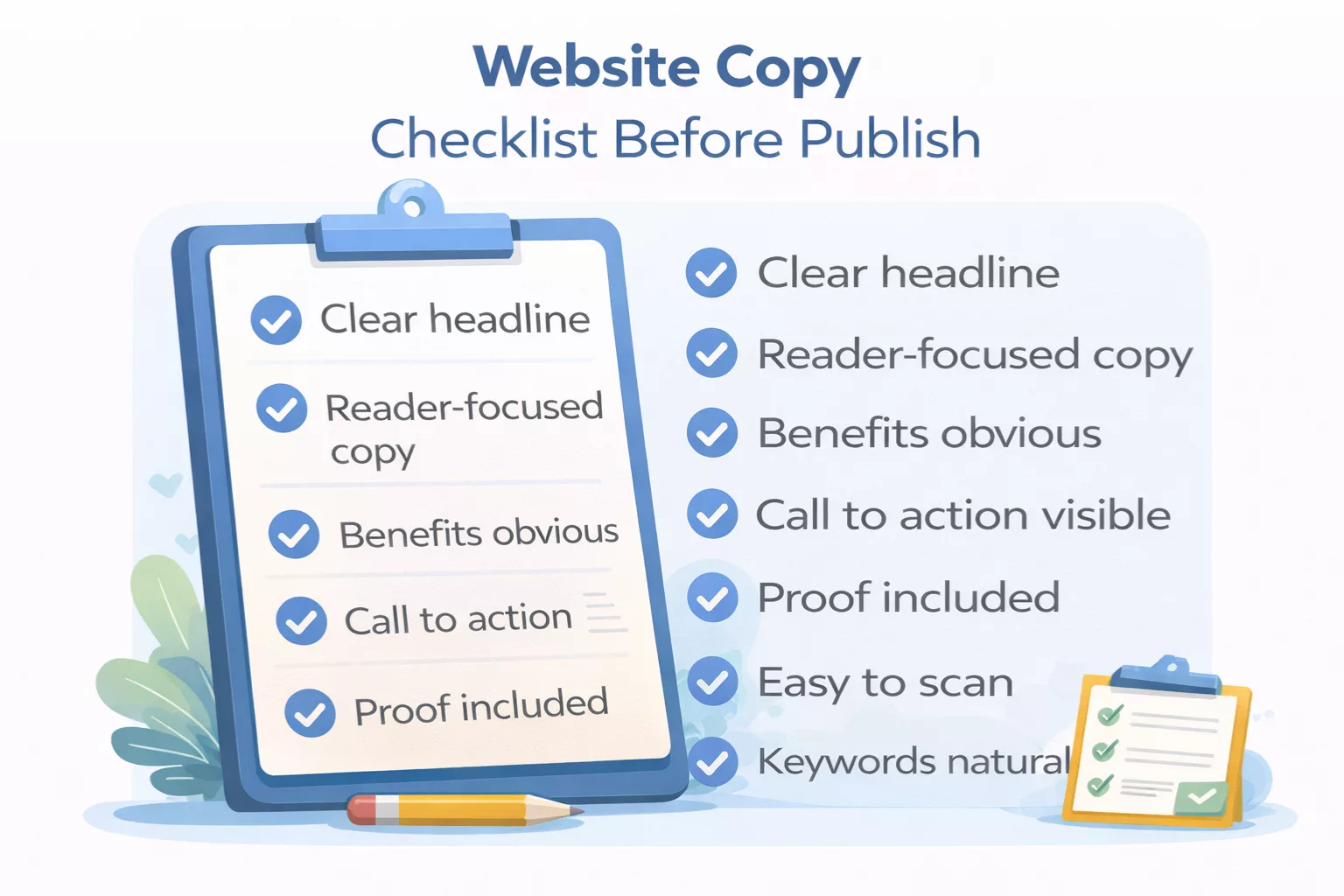
I used to hit publish too early.
The page looked finished, the sections were there, and I moved on. Later, I’d come back and wonder why it didn’t perform.
Now I pause and run a quick check.
Not a long audit. Just a simple pass to catch what actually matters. Most fixes take a few minutes, but they make a big difference.
Use this before you publish any page.
Is the main message clear in the first few seconds?
Open your page and read only the top section.
- Headline
- Subheadline
- First few lines
Ask yourself:
“Can someone understand what this page is about right away?”
If not, tighten it.
The headline should say what you do and who it helps. The subheadline should add context. No guessing.
If someone has to scroll to understand, you’ve already lost some of them.
Does each section serve a purpose?
Every section should move the reader forward.
Go through your page and check:
- Does this section explain something useful?
- Does it remove doubt?
- Does it guide the next step?
If a section feels like filler, it probably is.
I often find blocks of text that sound good but don’t do anything. Removing them makes the page stronger, not weaker.
Are benefits obvious?
Readers don’t want to figure things out.
They want to see quickly:
- What they get
- How it helps
- What changes for them
Scan your page and look for benefits.
If you mostly see features or general statements, rewrite them.
For example:
- “Custom website copy” → What does that lead to?
- “Clear messaging that helps visitors understand and take action”
Make the outcome visible.
Is the language simple and easy to read?
This one is easy to test.
Read your copy out loud.
If a sentence feels awkward, long, or heavy, simplify it.
Look for:
- Long sentences
- Complex words
- Unclear phrasing
Break things down.
Short paragraphs help too. One idea per paragraph keeps the flow steady.
If it’s easy to read, people stay longer.
Is there a clear next step for the reader?
This is where many pages fall apart.
After reading, what should the person do?
If the answer isn’t obvious, fix it.
Your call to action should be:
- Clear
- Visible
- Easy to follow
Examples:
- “Book a call”
- “Get a quote”
- “Start here”
Also check placement.
Don’t rely on a single CTA at the bottom. Add it where it fits naturally throughout the page.
This checklist isn’t about perfection.
It’s about removing friction.
When your message is clear, your sections have purpose, and your next step is obvious, the page starts working the way it should.
Before you publish, take a few minutes and run through this.
You’ll catch more than you expect.
To see how persuasive writing works in real situations, read how copywriting works.
Want to Improve Your Copywriting Faster?
Download the Copywriting Practice Pack and get simple exercises that help you write clearer headlines, stronger calls to action, and better website copy.
Get the Free Practice PackKey Takeaways
- Website copywriting helps turn visitors into leads, inquiries, and sales.
- Clear messaging beats clever wording on every important page.
- Strong headlines keep visitors reading and reduce bounce rates.
- Focus on reader problems, desired outcomes, and simple next steps.
- Homepage, About, Services, and Landing pages each need a different message.
- Use frameworks like AIDA or PAS when you need structure.
- Benefits, proof, and trust signals improve conversions.
- SEO works best when keywords are used naturally and copy stays readable.
- Avoid vague claims, long sentences, and weak calls to action.
- Review every page before publishing to remove confusion and friction.
Conclusion
Good website copy isn’t about sounding smart. It’s about being understood.
When your message is simple, focused, and written for a real person, everything changes. People stay longer. They trust you faster. They take action.
Start with one page. Fix the message. Make it clear. Then move to the next.
That’s how you build a website that actually works.
Website copy is one part of a bigger skill set. Learn more in what is digital writing.
Frequently Asked Questions
What is website copywriting?
Website copywriting is writing persuasive text for website pages to help visitors understand your offer and take action such as booking, buying, or signing up.
Why is website copywriting important?
Good website copy builds trust, explains benefits clearly, improves user experience, and increases conversions like leads or sales.
What pages need copywriting the most?
Your homepage, about page, services page, product pages, and landing pages need strong copy because they guide buying decisions.
What is the difference between copywriting and content writing?
Copywriting is designed to persuade and drive action. Content writing is designed to inform, educate, or attract traffic through articles and guides.
How do I improve website copy?
Use clear headlines, focus on benefits, remove vague wording, add proof like testimonials, and include a strong call to action on each page.
How long should website copy be?
Website copy should be as long as needed to create clarity and trust. Some pages need short copy, while sales or service pages may need more detail.
Should website copy include SEO keywords?
Yes. Use keywords naturally in titles, headings, and body text so pages rank in search engines without harming readability.
Can I write my own website copy?
Yes. Many business owners write their own copy by understanding their audience, using clear language, and focusing on one goal per page.